Last updated on 2009-02-16@22:43. The company I work for had finally realized the benefits of a decent source code versioning system so after a short evaluation they settled on Subversion. To make user management easier they also wanted to use Microsoft Active Directory, so I set off on a quest to make Apache talk to our Active Directory 2003 server for authentication. Before I explain to you how I set this all up on Debian Etch I have to get something off my chest first. Sensitive people may want to skip the next paragraph.
Microsoft Active Directory is a bit-rotten crock that should have never seen the light of day. After two full days of waving dead chickens at it, trying to make any sense of it's irrational behavior I would love nothing more than to pick it up and throw it off the roof of our building, BofH style, aiming it at the PHB that bought it in the first place. Or it's programmer. Whomever passes by first. It's API only vaguely resembles LDAP after at least three bottles of whiskey or one pan galactic gargle blaster and squinting really, really hard. Fortunately our management has seen the light of day after this little misadventure and in a few months we're migrating to Open-Xchange.
Right. That's settled. Back to making it work because we need Subversion before we have migrated to Open-Xchange. Let's start off by installing a bunch of software that we need: apache2, subversion and libapache2-svn. Make sure that the correct modules are enabled by symlinking then from /etc/apache2/mod-enabled to /etc/apache2/mods-available. Here are the relevant files:
- $ ls -al /etc/apache2/mods-enabled
- alias.load -> ../mods-available/alias.load
- auth_basic.load -> ../mods-available/auth_basic.load
- authnz_ldap.load -> /etc/apache2/mods-available/authnz_ldap.load
- authz_default.load -> ../mods-available/authz_default.load
- authz_user.load -> ../mods-available/authz_user.load
- dav.load -> ../mods-available/dav.load
- dav_svn.conf -> ../mods-available/dav_svn.conf
- dav_svn.load -> ../mods-available/dav_svn.load
- ldap.load -> ../mods-available/ldap.load
Apache2 on Debian Etch ships with mod_authnz_ldap instead of mod_auth_ldap, so if most of the online tutorials for LDAP authentication did not work for you, that's why. mod_authnz_ldap works just a little bit different. I am going to implement things in such a way that makes it easy to test your configuration in between. First we get Active Directory working and then we look at Subversion.
Active Directory authentication
Start off by creating a directory where later on you will host Subversion repositories and create a basic Apache configuration for it. For ease of testing make sure that you can view directory indexes. I chose to put my repositories under /var/lib/svn and I will use a virtual server for it. Create a new configuration file /etc/apache2/sites-available/svn and symlink it from /etc/apache2/sites-enabled/.
Update: You should not point your DocumentRoot to the directory that contains all your repositories. If you do that then Apache will not know if it should handle those himself of if he should hand it over to the Subversion module. That is why in these examples the DocumentRoot to /var/lib/svn/htdocs.
- NameVirtualHost *
- <VirtualHost *>
- DocumentRoot /var/lib/svn/htdocs
- ServerName svn.example.com
- ErrorLog /var/log/apache2/error.log
- LogLevel warn
- CustomLog /var/log/apache2/access.log combined
- ServerSignature On
- <Directory "/var/lib/svn">
- Options Indexes FollowSymLinks MultiViews
- Order allow,deny
- allow from all
- </Directory>
- </VirtualHost>
Now you should modify your local LDAP configuration. There's a problem with references when using Active Directory so you need to turn them off. Edit your /etc/ldap/ldap.conf and add:
- REFERRALS off
Now you can add the LDAP configuration directives to your Apache configuration. I find it very useful to test Active Directory using the LDAP protocol first. You can use this Java LDAP browser to test Active Directory an lookup some of the information that you need to add to Apache. LDAP authentication is a two-step process. First you need to bind LDAP to apache, then you can query information. So, you need an LDAP account to bind to. I recommend setting up a separate user for this and grating him rights to read everything but write nothing. You can test this account using the applet. Note that when connecting to the applet you need to specify the account to bind to as the "user principal name" (username@example.com) instead of the "distinguished name" (CN=username,DC=example,DC=com). In Apache you can use either. Here's a screenshot of the applet showing the settings that should work.
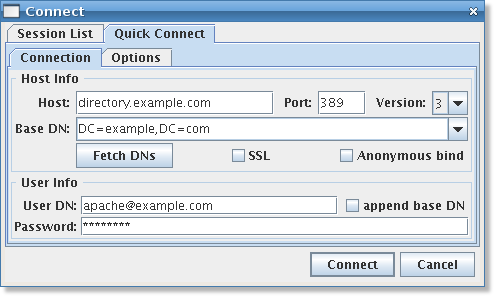
Update: The LDAP browser applet has disappeared from it's original website. Thankfully Aaron Z. Ward has found other copies of the applet at filewatcher. There is no license included so I cannot host it as an applet myself, but you should be able to download and run it locally if you have Java. Alternatively, you can also use Apache Directory Studio which can run stand-alone or as an Eclipse plugin.
If port 389 does not work for you for some reason, try port 3268. That port speaks a different LDAP dialect apparently (yes, that confuses me too). After you have filled out the hostname, port and protocol version you can click the "Fetch DNs" button to fill the "Base DN" field. When you click "connect" you should be able to browse your Active Directory.
Update: Peter Harvey-Rice let me know by e-mail about the difference between ports 389 and 3289.
Port 389 talks to the local AD server, and can see the local AD tree. Port 3289 talks to the 'Global Directory' on the AD server - if the option is enabled, and can see the whole forest if you have more than one tree in the directory - of course the other trees would be on other servers - but the info is consolidated into one forest.
When this works it's time to add the Apache LDAP configuration directives. I will explain them one by one afterwards. Add this to your VirtualHost configuration:
- <Location "/">
- AuthBasicProvider ldap
- AuthType Basic
- AuthzLDAPAuthoritative off
- AuthName "My Subversion server"
- AuthLDAPURL "ldap://directory.example.com:389/DC=example,DC=com?sAMAccountName?sub?(objectClass=*)" NONE
- AuthLDAPBindDN "CN=apache,CN=Users,DC=example,DC=com"
- AuthLDAPBindPassword hackme
- require valid-user
- </Location>
AuthBasicProvider ldap and AuthType Basic tell Apache to use LDAP for authentication. AuthzLDAPAuthorative off tells Apache that LDAP does not have the final word over who gets access and who doesn't. This is one of the differences between mod_auth_ldap and mod_authnz_ldap. In our case, LDAP just passes some information back to Apache and mod_authz_user has the final decision over who gets access and who does not. The AuthName directive sets the title that the users will see on their login popup. Next up is the AuthLDAPUR:. It's built up as such:
- "protocol://hostname:port/base?attribute?scope?filter" NONE
base is the BaseDN you want to search under. Pick whatever worked in the Java Applet. Usually just your domain name (above it's example.com) will do. The LDAP attribute is what you try to match to the username that the user typed in. Browse through LDAP to see what possibilities are available. The sAMAccountName is the name that Windows users use to login to their system. The scope parameter tells LDAP how deep to search beneath the BaseDN. Do yourself a favour and leave it on "sub" (all the way). The filter determines what kind of objects should be returned. In my example I play safe again and say "all objects".
Officially the base, attribute, scope and filter are all optional variables but Active Directory refused to play ball if I did not specify everything. Also, I have no idea why the URL needs to be in double quotes and why it needs to be followed by the word NONE. All I know is that it doesn't work if I omit it. If someone knows, please leave a comment so I can amend this article.
Updated on 2007-12-03@23:38. Alex Belbey contributes that NONE specified the kind of connection to use. In this case an unsecured connection (as opposed to e.g. an SSL or TLS encrypted connection).
- NONE
- stablish an unsecure connection on the default LDAP port. This is the same as ldap:// on port 389.
- SSL
- Establish a secure connection on the default secure LDAP port. This is the same as ldaps://
- TLS/STARTTLS
- Establish an upgraded secure connection on the default LDAP port. This connection will be initiated on port 389 by default and then upgraded to a secure connection on the same port.
After the AuthLDAPURL is the user information for the user you wish to bind LDAP to. You can use the distinguished name as I have done in the example, but you can also use the user principal name:
- AuthLDAPBindDN "apache@example.com"
Finally we tell Apache with the require directive that all users should be given access. If you now restart your Apache server with /etc/init.d/apache2 restart you should be able to successfully login. Congratulations, the hardest part is done. If it does not work then you need to look at the apache error log to see what goes wrong. It's a bit cryptic so I will explain that as well. As I explained before, LDAP authentication is a two-step process of binding and querying. Either step can fail and the error log will tell you why. If the bind step fails then there is something wrong with the AuthLDAPBindDN, the AuthLDAPBindPassword or the AuthLDAPURL. Here's what a bind failure looks like:
- auth_ldap authenticate: user apache authentication failed; URI / [LDAP: ldap_simple_bind_s() failed][Invalid credentials]
If the bind works but something goes wrong with the query, the error is probably caused by a fault AuthLDAPURL and will look something like:
- auth_ldap authenticate: user John Doe authentication failed; URI / [ldap_search_ext_s() for user failed][Operations error]
It's also possible that you do not see any error at all in the logfile. In that case, LDAP works but something goes wrong when Apache's mod_authz_user tries to determine if it should grant access or not.
Update: Mark van Sintfiet adds that in order for require ldap-group to work, you should use the full distinguishedName field in the ldap-group directive. If you do not, Active Directory will fail to authenticate. You can use the Java LDAP browser mentioned above to lookup the distinguishedName.
Subversion integration
Adding subversion to the LDAP/Apache mix is actually quite easy. Start off by removing the <Directory> block and the DocumentRoot directive because you cannot access the same URL though regular Apache and Subversion at the same time. You can also simply point the DocumentRoot somewhere else so you can create an information page when users hit the root. I will be setting up two groups of repositories that are writable by two groups of LDAP users, plus a sandbox repository for everyone so they can play with Subversion. Start by creating two directories in /var/lib/svn that will hold the repositories. Then create some Subversion repositories.
- $ cd /var/lib/svn
- $ mkdir group1
- $ mkdir group2
- $ svnadmin create /var/lib/svn/sandbox
- $ svnadmin create /var/lib/svn/group1/g1-repository
- $ svnadmin create /var/lib/svn/group1/g2-repository
Now you need to create some <Location> directives in Apache for these repositories. The require ldap-group directives tell Apache to only allow in a certain group. Note that the ldap-group value must not be in quotes. By using a <LimitExcept> I only protect writing to a repository. Everyone can read all repositories. Here is what the full configuration looks like in the end:
- NameVirtualHost *
- <VirtualHost *>
- DocumentRoot /var/lib/svn/htdocs
- ServerName svn.example.com
- ErrorLog /var/log/apache2/error.log
- LogLevel warn
- CustomLog /var/log/apache2/access.log combined
- ServerSignature On
- <Location "/">
- AuthBasicProvider ldap
- AuthType Basic
- AuthzLDAPAuthoritative off
- AuthName "My Subversion server"
- AuthLDAPURL "ldap://directory.example.com:389/DC=example,DC=com?sAMAccountName?sub?(objectClass=*)" NONE
- AuthLDAPBindDN "CN=apache,CN=Users,DC=example,DC=com"
- AuthLDAPBindPassword hackme
- require valid-user
- </Location>
- # The sandbox repository can be written to by anyone
- <Location "/sandbox">
- DAV svn
- SVNPath /var/lib/svn/sandbox
- </Location>
- # repositories for Group 1
- <Location "/group1">
- DAV svn
- SVNParentPath /var/lib/svn/group1
- SVNListParentPath on # Show an index of all repositories in /var/lib/svn/group1
- <LimitExcept GET PROPFIND OPTIONS REPORT>
- require ldap-group CN=Group 1,DC=example,DC=com
- </LimitExcept>
- </location>
- # repositories for Group 2
- <Location "/group2">
- DAV svn
- SVNParentPath /var/lib/svn/group2
- SVNListParentPath on # Show an index of all repositories in /var/lib/svn/group2
- <LimitExcept GET PROPFIND OPTIONS REPORT>
- require ldap-group CN=Group 2,DC=example,DC=com
- </LimitExcept>
- </location>
- </VirtualHost>
The DAV svn directive tells Apache that Subversion will handle these requests. The SVNPath directive allows access to a single repository and SVNParentPath allows access to a directory full of repositories. By setting SVNListParentPath it will show all the repositories in the directory. Compared to getting Active Directory to work, this is all very easy.
I hope this article saves someone from the Active Directory nightmare I had. Happy (sub)versioning!


Comments
#1 H B
#2 Sander Marechal (http://www.jejik.com)
I don't have an immediate solution. I suggest that you use the LDAP
browser Java applet that I pointed to in the article, connect to your
Active Directory server and lookup a user. In the left column there
should be field names like sAMAccountName, userPrincipalName, etcetera.
Whatever fieldname you put in the AuthLDAPURL directive in Apache is
what will be matched against the username entered. Just scroll through
the list of fields inside a user and see if there is a field with the
value of DOMAIN\User. If there is, put that fieldname in the AuthLDAPURL
(instead of sAMAccountName).
#3 Mark van Sintfiet (http://www.markvansintfiet.nl)
The only thing that doesn't work is the "require ldap-group" for setting up authentication based on AD groups.
I get this error in my apache2\error.log:
[error] [client 192.168.0.73] access to /P0001 failed, reason: require directives present and no Authoritative handler.
If I replace the "require ldap-group" with "require valid-user" in the same <location>...</location> everything works fine.
I'm using Debian Etch and Windows 2003 SBS!
#4 Sander Marechal (http://www.jejik.com)
I have had someone ask me the same question via e-mail. I don't have an exact solution. It's a bit of fiddling to get it *just* right. You could try setting AuthzLDAPAuthoritative to "on" but when you do that, your "require valid-user" will fail, although ldap-group will work. I solved it for my case after hours and hours of trying hundreds of different configurations. That's why my article started with a rant :-)
I have asked the person that e-mailed me if I can post our full conversation here and if he will send me the changes he made to get it working for both ldap-group and valid-user. Hopefully that will help you too. I suggest you check back here in a few days.
PS: When I try to load your site in FireFox I get an XML parsing error.
#5 Mark van Sintfiet (http://www.markvansintfiet.nl/)
Changing:
to:
solved most of my problems.
So I had to specify exactly where my group was in the AD. After this I made an OU for Subversion in my Active Directory to put all the groups related to Apache/Subverion. To use a group in an OU it looks like this:
To know what to use for sure you can use the JAVA ldap browser in this article to lookup your group and look for the property: "distinguishedName", the value of this property is what you have to use as the "require ldap-group" value.
Last but not least, there is a very strange thing. I have to restart Apache after adding users to my group in the AD( on the Windows 2003 SBS server). I find it strange, maybe it will work over time if you don't restart Apache, I'm not patient enough for that. I know for sure, restarting Apache does the job.
Everything works great for me now, I also use Trac with the same
authentication.
Does someone have experience with adding SSL(https) to this configuration? With an self-created not-trusted certificate, I don't wanna pay for it, I just want my information to be send encrypted.
#6 Sander Marechal (http://www.jejik.com)
Thanks for figuring out how to solve the ldap-group problem. I don't use SSL at work so I haven't tried it myself, but from looking at a couple of online resources such as this one (for Debian) or this one (for Ubuntu) it doesn't look hard. Just
To:
NameVirtualHost *:443 <VirtualHost *:443> SSLEngine on SSLCertificateFile /etc/apache2/ssl/apache.pem SSLProtocol all SSLCipherSuite HIGH:MEDIUM#7 Anonymous Coward (http://opensourcedevelopment.net)
You can download the complete package from http://opensourcedevelopment.net/text-tutorials/apache-subversion-active-directory.html
this is working copy of complete package.
Regards
#8 Federico Castagnini (http://castagnini.com.ar)
the problem is that you don't include the following lines in every "<Location" sections:
AuthBasicProvider ldap
AuthType Basic
AuthzLDAPAuthoritative off
AuthName "My Subversion server"
AuthLDAPURL "ldap://directory.example.com:389/DC=example,DC=com?sAMAccountName?sub?(objectClass=*)" NONE
AuthLDAPBindDN "CN=apache,CN=Users,DC=example,DC=com"
AuthLDAPBindPassword hackme
require valid-user
i recommend to write that section on a separate file an include in every <Location section.
Best regards!
Fede
#9 Sander Marechal (http://www.jejik.com)
#10 VeZouL (http://vezoul.blogspot.com)
Mark van Sintfiet : try change ldap-group to group
#11 sBox
LDAPVerifyServerCert off
LDAPTrustedMode SSL
This forces SSL and prevents verification of the certificate. Change your LDAP URL to use LDAPS:
ldaps://dc01.mydomain.local:636/ou=User Accounts,dc=mydomain,dc=local?sAMAccountName?sub?(objectClass=*)
I can go into the various things I've tried with getting the verification to work if anyone cares to know.
#12 HarlequinSmurf
Typically when using the old password file setup you can configure different access restrictions inside the repository using the AuthzSVNAccessFile parameter in your apache config or your .htaccess file. The format of that file is
[repository:/path/into/repository]
user = permission
@group = permission
* = permission
groups are defined at the top of the file in the format
groupname = user1, user2, user3
permissions area r = read and w = write and the * in the list means anyone not yet explicitly given permissions.
I ask as so far i've not come across any decent suggestions on how to do this and wonder if you have set something up for this type of control.
#13 Sander Marechal (http://www.jejik.com)
#14 bumpwhite
Do I need to download code and build the httpd.exe with a ldap specific argument? What am I missing?
Thanks!
#15 Sander Marechal (http://www.jejik.com)
You should not have to. Apache on Linux supports dynamically loaded modules. I'd be surprised if the Windows version can't do that. I suggest that you ask on #apache on irc.freenode.net. I have very little knowledge of Apache under Windows (or Windows in general for that matter).
#16 CVS-Admin
So here is what we need..
1.Remove Audit exception
2.Remove passwd exception
And we initially thought of handling CVS passwd exception by integrating with LDAP server but which looks pretty much complex . so we are now trying to integrate with Active Directory.
When we googled for Integrating with Active dir we got links talking about
SVN + Apache + Active Directory seems to work better.....
AND its urgent need for our client, so kinldy help us with the above scenario
IF SVN+Apache+Activ dir is a Good option then kindly let us know the possibilties of implementing it , It will be good if we have a Documentation.....
Important : We will then have to migrate 100+ CVS rep to SVN , kindly give us some leads on that also
Thanks a LOOOTTT
#17 Sander Marechal (http://www.jejik.com)
I'm not very familiar with with CVS. I'm guessing that CVS passwd is used to change passwords or create accounts and that CVS Audit is used to find out who changed what and when.
Subversion is certainly capable of doing this. Subversion was designed to be just like CVS but with all the shortcomings of CSV fixed. But a quick migration from CVS to Subversion is not easy, especially not for your users. Subversion definitely works in a different (though similar) way.
I suggest you read this book: Version Control with Subversion. Read chapters 1, 2 and 4 to get a good idea of how Subversion works (you can skip chapter 3 for now). Then read Appendix B which explains the differences between Subversion and CVS. Then decide for yourself if Subversion suits you.
If you decide to switch from CVS to Subversion then you want to look at cvs2svn which can import your CVS repositories into Subversion. Use my article to get Active Directory working.
I'm afraid I can't help you any more. Good luck!
#18 Smittles
#19 Sander Marechal (http://www.jejik.com)
In the "Host" field you should put the domain name of your LDAP/AD server, e.g. ldap.smittles.com. The "Base DN" field refers to the domain that the LDAP/AD server serves user for. You can get this information from your LDAP or AD configuration, but usually it's your domain name: "DC=smittles,DC=com".
The "User DN" field should contain an unique identification for the user that can read the LDAP/AD directory. In my screenshot I used that user's e-mail address. On most LDAP servers you can also use something like "CN=someuser,DC=smittles,DC=com". If you use Active Directory that last form will usually not work. For AD you need either the e-mail address or the exact value of that user's Distingushed Name record.
I hope this helps!
#20 Smittles
NameVirtualHost *
<VirtualHost *>
DocumentRoot /var/lib/svn
ServerName svn.example.com
ErrorLog /var/log/apache2/error.log
LogLevel warn
CustomLog /var/log/apache2/access.log combined
ServerSignature On
<Directory "/var/lib/svn">
Options Indexes FollowSymLinks MultiViews
Order allow,deny
allow from all
</Directory>
</VirtualHost>
Not only am I confused as to whether I should be using svn.example.com, but also the name of the XML tag, VirtualHost. There's an asterisk which I don't understand, and maybe I'm assuming too much, but should I be originating the name of this tag or is it specific to Apache?
#21 Smittles
Is LDAP assumed to be installed already? Am I supposed to have configured LDAP to some degree already? Also, I'm assuming that LDAP is intended to be installed on my Linux box as opposed to my Windows Server 2003 box. Is that a correct assumption?
#22 Smittles
I'm having a hard time understanding what this means. Does this mean "Create a new configuration file in the directory /etc/apache2/sites-available/, and name it svn.conf. Then symlink it to /etc/apache2/sites-enabled/ ? If it does no mean exactly what I just wrote, would you mind elaborating?
Thanks a whole lot.
#23 Sander Marechal (http://www.jejik.com)
You should replace svn.example.org with the domain name of the Subversion server that you are building. You do not need to change the asterisk in the VirtualHost tag. If you want to know what it means, check out The Apache docs.
Yes, you need to have a working LDAP or Active Directory server for my examples.
No. You can have LDAP on a different machine. My examples assume that your LDAP server is a Microsoft Active Directory server running on Windows somewhere, while Apache and Subversion are on your Linux server.
Yes, exactly.
#24 Smittles
#25 Anupam
Tried ur solution with on Fedora 9, the authentication thing works OK. but whenever i try to access the subversion repository from a client, after authenticating it give following error:
[Thu Oct 16 16:31:26 2008] [error] [client 192.168.128.45] Could not fetch resource information. [301, #0]
[Thu Oct 16 16:31:26 2008] [error] [client 192.168.128.45] (84)Invalid or incomplete multibyte or wide character: Requests for a collection must have a trailing slash on the URI. [301, #0]
[Thu Oct 16 16:31:27 2008] [error] [client 192.168.128.45] Could not fetch resource information. [301, #0]
[Thu Oct 16 16:31:27 2008] [error] [client 192.168.128.45] (2)No such file or directory: Requests for a collection must have a trailing slash on the URI. [301, #0]
Can you help on this.
#26 Sander Marechal (http://www.jejik.com)
Looks like there is something wrong with the ServerName in your Apache configuration. When I search for that error message in Google, the very first hit tells you what's wrong and how to solve it:
http://svn.haxx.se/users/archive-2005-02/0258.shtml
http://www.onlamp.com/pub/a/apache/2004/02/19/apache_ckbk.html?page=2
#27 Smittles
user@ubuntu8041:/$ sudo etc/init.d/apache2 restart* Restarting web server apache2
Syntax error on line 11 of /etc/apache2/sites-enabled/svn.conf
Unknown Authn provider: ldap
I've done a Google search, but to no success. What's the issue?
#28 Sander Marechal (http://www.jejik.com)
You can also try to load the modules by using the a2enmod command. Restart Apache and see if you still get errors. Also, be sure to check the Apache error log. If some modules fail to load for some reason then it will be logged there.
#29 Anupam
Thanks for your reply, i have sorted out the problem.
"Could not fetch resource information. [301, #0]," i m using SVNParentPath Directive in the configuration and i was calling the parent directory in my client/browser, but when i used the exact
url/location of the repository in my client/browser it worked. i dont know what is the actual problem but it is working this way.
I would like to share my installation procedure with you all..
What i find out is you need to install all the softwares from the sources rather than the using .rpms/.deb packages. After you install the linux box (make sure u installed the minimum installation
plus the development libraries, you don't need any thing more.) please check whether the software got installed automatically or not (i found that openldap and subversion got installed but i have
not seleted them.) .
you can use rpm -qa | grep subversion . If you find some packages do remove themusing e.g. rpm -e subversion --no deps. you shuold do this for all the softwares you you need to compile to
avoid clash.
now install all softwares (Download sources you will need for openldap, apache, apr, apr-util, BerkeleyDB and subversion.)(i m assuming you download the sourcers and untar them)
---Install ldap client library--
cd openldap......
./configure --disable-slapd --disable-slurpd
make depend
make
make install
***/usr/local/lib == ldap libraries are installed here
***/usl/local/include == ldap include headers are installed here
---Install apr--
cd apr....
./configure
make
make install
**/usr/local/apr == apr library are installed here
--Install berkeley DB
cd db.....
cd build_unix
../dist/configure
make
make install
***/usr/local/BerkeleyDB == db library are installed here
--Install apr-util--
cd apr-util.....
./configure --with-apr=/usr/local/apr/ --with-berkeley-db=/usr/local/BerkeleyDB.4.6/ --with-ldap=ldap --with-ldap-include=/usr/local/include/ --with-ldap-lib=/usr/local/lib
make
make install
***/usr/local/apr ==apr-util library are installed here
--Install apache--
cd httpd...
./configure --with-apr=/usr/local/apr/ --with-apr-util=/usr/local/apr/ --enable-authnz-ldap --enable-ldap --enable-dav --enable-dav-fs --enable-dav-lock --enable-auth-digest --enable-so --enable-rewrite --enable-info--enable-auth-basic --enable-maintainer-mode
make
make install
**/usr/local/apache are installed here
--Install neon--
cd neon....
./configure --enable-shared
make
make install
--Install subversion--
cd subversion...
./configure --with-apr=/usr/local/apr/ --with-apr-util=/usr/local/apr/
make
make install
you will need to add apache user and group and use them in httpd.conf file. the repository (/location) and document root folder should be owned by apache user
# Chown -R apache:apache /var/www/html
# Chown -R apache:apache /srv/svn/repos (use the path of ur repos)
the subversion config mentioned in this document is ok and can be used without any problem (I just removed the VirtualHost directives)
the basic stucture svn repo has 3 folders (branches, tags, trunk) . first step is to import the basic structure into repo.
#mkdir repo1
#cd repo1
#mkdir branches
#mkdir tags
#mkdir trunk
now import them to your repository
#svn import -m "Initial Import" /path to /repo1/ http://svn.servername.com/svn/repo/project1
now you can browse the repository using client or browser.
#30 Sander Marechal (http://www.jejik.com)
#31 Smittles
Did anybody else run into this problem, or was it my mistake?
#32 Sander Marechal (http://www.jejik.com)
I really can't think of any reason why that should happen. It would be a pretty serious flaw if that was true. Occams Razor suggests that you accidentally made a mistake somewhere. Try to reproduce it if you can, and file a bug about it with Ubuntu if it happens again.
#33 Anonymous Coward
#1 Take my advice and switch to Solaris 10 or Open Solaris, both easily support Micosoft AD out of the box and Solairs cost of ownership is much lower.
#2 MS AD is best of breed. You may not believe it, but the biggest companies in the world use it and love it. It can take hundresd of thousands of objects and performa like a champ.
#3 You cant take a heart out of a pig and put it in a duck without problems.
#4 You got it to work on your own, be proud of yourself, it means you have a brain.
#5 Microsofts AD API are plublished and if you can program, the sky is the limit, but you need to get over your bias. AD != LDAP
have fun and thanks for the read.
#34 Sander Marechal (http://www.jejik.com)
#2 It doesn't mean anything that "the biggest companies love it". Big companies make dumb decisions and suffer from Lock-in and corporate inertia. The only reason AD is big is because Windows can't authenticate against a standard LDAP. It's called "lock-in".
#3 No, but the pig heart works fine in a human: http://en.wikipedia.org/wiki/Xenotransplantation
#4 Thank you
#5 AD is LDAP with the traditional "Extend, Embrace, Extinguish" sauce all over it. There's no bias in there. Microsoft itself admitted (inadvertently) that it aims to decommoditize protocols. They do it just to break standards-conforming implementations. See also Halloween I
#35 Smittles
Have I done something wrong in this code?
NameVirtualHost *


<VirtualHost *>


 DocumentRoot /var/lib/svn


 ServerName svn.internal.mycompany.com


 ErrorLog /var/log/apache2/error.log


 LogLevel warn


 CustomLog /var/log/apache2/access.log combined


 ServerSignature On


 <Location "/">


        AuthBasicProvider ldap


        AuthType Basic


        AuthzLDAPAuthoritative off


        AuthName "My Subversion server"


        AuthLDAPURL "ldap://sp-dc1.internal.mycompany.com:389/DC=internal,DC=mycompany,DC=com?sAMAccountName?sub?(objectClass=*)" NONE


        AuthLDAPBindDN "CN=SVN Apache,OU=IT,CN=Users,DC=internal,DC=mycompany,DC=com"


        AuthLDAPBindPassword hackme


        require valid-user


 </Location>


 <Directory "/var/lib/svn">


	Options Indexes FollowSymLinks MultiViews


	Order allow,deny


	allow from all


 </Directory>


</VirtualHost>
#36 Anonymous Coward
http://support.microsoft.com/kb/555092
#37 Sander Marechal (http://www.jejik.com)
1) What does your Apache error log say and what does your browser and/or Subversion client say? It's kinda hard to debug this when you don't have any clue of which part isn't working right.
I see from your config that you have't even integrated Subversion yet, so the problem is simply getting authenticated against AD?
2) The usual culprit is AuthLDAPBindDN. Active Directory is quite anal about what it should be. There are three things you can try:
2.1) Double check that the field is exactly the same as the "Distinguished Name" in Active Directory.
2.2) If that doesn't work then you can try to use the "User Principal Name" field. This will be like it's e-mail address (e.g: svn.apache@yourcomapny.com).
2.3) How well do you know the network administrator? :-) When I first implemented AD authentication I had a lot of trouble creating a user in AD that had all the proper rights and settings to be able to bind with Apache. At some point we tried the network administrator account (administrator@yourcompany.com) as the account to bind with and then everything started working. Then we knew that the problem was with AD and not with Apache so our network admin started fiddling with the AD settings for our bind account until it worked.
Just to drive the message home: Using the network administrator account to bind Apache to AD is a huge security gap! The network administrator password will need to be in cleartext in the Apache configuration. Use only for debugging and ask your AD/network admin for permission!
3) Did you turn "Referrals" off in /etc/ldap/ldap.conf ?
PS: Your DocumentRoot points to /var/lib/svn which I presume is where you store your repositories. You should really point it somewhere else. Starting with Subversion 1.5 / Apache 2.2 you will get an infinite redirect loop because Apache cannot figure out if he should handle the request itself or hand it off to Subversion. (Article has been updated to reflect this).
PPS: If you still have trouble after trying all this, contact me directly. Either use the contact form on this site or look at my resume for my e-mail address. We can try to set up a meeting in IRC so I can help you faster.
#38 Smittles
I have turned REFERRALS off.
To answer your question about network administration, I have administrative privilege to this system, but I'm in training, so I'm trying to play it as safely as possible. I'm aware that the administrator@mycompany.com is a security flaw, and have created a read all / write none user named svn.apache (following our first.last naming convention).
The error log reads as follows:
[Thu Oct 30 05:45:12 2008] [error] [client 192.168.1.139] user svn.apache not found: /svn
The news that I haven't integrated subversion is disconcerting, as I believe I had taken that measure. However, I've now included a 'sandbox' repo with the same open permissions, just to test. I've svnadmin create /var/lib/svn/sandbox, and added an htdoc directory to the /var/lib/svn, and updated my script accordingly.
However, now, when restarting Apache, I get
httpd (no pid file) not running
I'd like to just set up sandbox and test from there. I assume the rest is easy once I've successfully tested one log-in.
#39 Sander Marechal (http://www.jejik.com)
Can you add "LogLevel debug" and try again? That should give you a detailed log of how Apache tries to do the ldap authentication.
As for the "no pidfile" problem, manually kill the running Apache process(es) and try starting it again.
#40 Smittles
Here's the debug output:
user@ubuntu8041:~$ sudo /etc/init.d/apache2 restart

[sudo] password for user:

 * Restarting web server apache2

[Mon Nov 03 08:58:36 2008] [debug] mod_authnz_ldap.c(875): [25579] auth_ldap url parse: `ldap://sp-dc1.internal.screenplayinc.com:389/DC=internal,DC=screenplayinc,DC=com?sAMAccountName?sub?(objectClass=*)'

[Mon Nov 03 08:58:36 2008] [debug] mod_authnz_ldap.c(884): [25579] auth_ldap url parse: Host: sp-dc1.internal.screenplayinc.com:389

[Mon Nov 03 08:58:36 2008] [debug] mod_authnz_ldap.c(886): [25579] auth_ldap url parse: Port: 389

[Mon Nov 03 08:58:36 2008] [debug] mod_authnz_ldap.c(888): [25579] auth_ldap url parse: DN: DC=internal,DC=screenplayinc,DC=com

[Mon Nov 03 08:58:36 2008] [debug] mod_authnz_ldap.c(890): [25579] auth_ldap url parse: attrib: sAMAccountName

[Mon Nov 03 08:58:36 2008] [debug] mod_authnz_ldap.c(892): [25579] auth_ldap url parse: scope: subtree

[Mon Nov 03 08:58:36 2008] [debug] mod_authnz_ldap.c(897): [25579] auth_ldap url parse: filter: (objectClass=*)

[Mon Nov 03 08:58:36 2008] [debug] mod_authnz_ldap.c(977): LDAP: auth_ldap not using SSL connections

[Mon Nov 03 08:58:47 2008] [debug] mod_authnz_ldap.c(875): [25588] auth_ldap url parse: `ldap://sp-dc1.internal.screenplayinc.com:389/DC=internal,DC=screenplayinc,DC=com?sAMAccountName?sub?(objectClass=*)'

[Mon Nov 03 08:58:47 2008] [debug] mod_authnz_ldap.c(884): [25588] auth_ldap url parse: Host: sp-dc1.internal.screenplayinc.com:389

[Mon Nov 03 08:58:47 2008] [debug] mod_authnz_ldap.c(886): [25588] auth_ldap url parse: Port: 389

[Mon Nov 03 08:58:47 2008] [debug] mod_authnz_ldap.c(888): [25588] auth_ldap url parse: DN: DC=internal,DC=screenplayinc,DC=com

[Mon Nov 03 08:58:47 2008] [debug] mod_authnz_ldap.c(890): [25588] auth_ldap url parse: attrib: sAMAccountName

[Mon Nov 03 08:58:47 2008] [debug] mod_authnz_ldap.c(892): [25588] auth_ldap url parse: scope: subtree

[Mon Nov 03 08:58:47 2008] [debug] mod_authnz_ldap.c(897): [25588] auth_ldap url parse: filter: (objectClass=*)

[Mon Nov 03 08:58:47 2008] [debug] mod_authnz_ldap.c(977): LDAP: auth_ldap not using SSL connections

                                                                         [ OK ]
#41 Sander Marechal (http://www.jejik.com)
PS: Make sure you go through the debug output and remove any sensitive bits before posting :-)
#42 Smittles
I replaced LogLevel warn with LogLevel debug.
Should I have kept LogLevel warn? My error.log (@ /var/log/apache2) is basically the same...
[Tue Nov 04 10:05:15 2008] [error] [client 192.168.1.139] user svn.apache not found: /svn/sandbox
#43 Sander Marechal (http://www.jejik.com)
No, LogLevel debug gives you much more information.
Hmmm.. that would indicate that the Apache part is working fine and that the problem is with Active Directory. What does your access.log say when you visit the URL and try to authenticate?
Also, what do the access.log and error.log say when you try to log in as a different user than svn.apache?
#44 Adrian M
However, I've jsut posted a news NNTP question about one issue I'm not understanding.
If I login to the repos using my username/password, all is well. If I then change my password on my PC, close Firefox (which Im using to test, and access ViewVC), I get prompted again for username/password, which is ok, as it'll be session based.
However, if at this point I enter either the old or the new password, then Apache seems to authenticate ok. Any other password and it fails as expected.
This does concern me though, as it means if I change a users password to lock them out, then they can still access the repos ok.
I'm not sure whos caching what here. I setup some LDAP directives in Apache to make sure that the TTL cache is only 10 mins. But 15 mins later my old password is still working.
I'm wondering if AD has a "use-last-password-ok" setting somewhere.
I'm also wondering, if I should drop LDAP lookups, and maybe try Kerbrous authentication instead. Anyone got that working?
#45 Sander Marechal (http://www.jejik.com)
Also, are you sure that you can only authenticate using Active Directory over mod_authz_ldap? It's possible to configure Apache to use multiple authentication methods. Perhaps you're also using PAM over LDAP with a larger cache time?
I haven't tried Kerberos, but if it works for regular Apache stuff it should work for Subversion as well.
#46 BrianT
I have SVN and apache running, just trying to add the LDAP/ActiveDirectory portion to it now.
My config is:
<Location /svn/aesrepos/>

  DAV svn

  SVNPath /tmp/svnrootaes/

  SVNListParentPath on

  AuthName "svn repository"

  AuthType Basic

  AuthBasicProvider ldap

  AuthLDAPURL "ldap://ourserver.global.company.com:389/ou=Global Users,dc=global,dc=company,dc=com" NONE

  AuthLDAPBindDN "cn=admin,ou=global services,dc=global,dc=company,dc=com"

  AuthLDAPBindPassword ******

  AuthzLDAPAuthoritative off

  require valid-user

</Location>
When I enter my username/pwd to for a SVN checkout, I get the following error msg:
auth_ldap authenticate: user briant authentication failed; URI /svn/aesrepos/trunk [User not found][No such object]
I am able to log on using the Java browser with the config values just fine. I have tried variations of
AuthzLDAPAuthoritative on
and
require ldap-group <my-group-credentials>
and
AuthLDAPURL "ldap://ourserver.global.company.com:389/ou=Global Users,dc=global,dc=company,dc=com?sAMAccountName?sub?(objectClass=*)"
and
AuthLDAPURL "ldap://ourserver.global.company.com:389/ou=Global Users,dc=global,dc=company,dc=com?cn?sub"
but always the [User not found][No such object] error.
It's almost like my user is not in the directory. Which I know it is because I can access it thru the Java browser.
Ever seen that?
Thanks,
Brian
#47 Sander Marechal (http://www.jejik.com)
Then have a look at your error.log and access.log. It should tell you much more about what authx_ldap is doing and what is failing. Post the logs here if you still cannot figure it out.
#48 joey d.
Using the java applet I can bind in with my login details and can see the AD structure.
However I have to put my domain in front of my username (ie. he2\joeyd1)
It doesn't work with my e-mail address... :(
It seem's when I load the website it tries to bind into AD but fails.
I get the following error:
[Fri Nov 21 17:03:59 2008] [warn] [client 149.191.222.51] [21505] auth_ldap authenticate: user joed1 authentication failed; URI /test [LDAP: ldap_simple_bind_s() failed][Invalid credentials]
[Fri Nov 21 17:03:59 2008] [error] [client 149.191.222.51] user joeyd1: authentication failure for "/test": Password Mismatch
Is there anything you can suggest how I could put in my domain\username into AuthLDAPBindDN line?
The other thing which might can be a problem.
I have openldap installed but it is not on active service therefore I put referrals off in vain.
It's a solaris 8 box and all my installation is under /usr/local
Do I need openldap running here? I just can't see the point.
Thanks for the advice!
j
#49 Sander Marechal (http://www.jejik.com)
Your errorlog suggest that the bind is working fine. If the bind fails, it looks like this:
So either you're putting in the wrong credentials or there is a problem with your AuthLDAPURL. The last bits of the AuthLDAPURL determine what field in LDAP is matched against the username you put in the auth request popup (usually that's sAMAccountName).
I suggest you take another look at the Java applet and see if your AuthLDAPURL is correct. This is what I use:
#50 joey d.
Thanks for the reply.
I think the first line of my log shows that it fails to bind. :(
Can I bind into the AD with a normal user account or do I need any special (manager) one to do that?
I have installed a solaris package of apache (2.2.9) from sunfreeware and it seems using mod_authnz_ldap. Would you suggest recompiling it? Can it make that much difference?
Thanks.
#51 Jean-Luc (http://www.record.ch)
#52 Sander Marechal (http://www.jejik.com)
Yes, you are right. My apologies. The line wrap had me fooled.
In theory you should be able to bind with many accounts. I suggest you use the Java applet and browse to the user that you want to bind as. Then look at the distinguishedName field and put exactly that value in the AuthLDAPBindDN line.
This is one of the tricky things of AD as opposed to "standard" LDAP. You need to bind with the exact distinguishedName that AD expects.
@Jean-Luc: I cannot say. It has to do with the way that you LDAP/AD is set up and configured. Is there perhaps another cn that you can use that does contain all the users? E.g. cn=Users,dc=domain,dc=com?
#53 joey d.
Finally I have got that working. Thanks for your help!
This being a global company had 3 OUs and 4 DCs in the connection string of my account. I managed to bind in finally and it is working now.
To avoid this long string I am now binding in my userPrincipalNAme .
Now I can play with group authorisation :)
Thanks for this great tutorial and your help!
#54 Stephen Connolly (http://javaadventure.blogspot.com/)
The reason for using SASL is that it supports the "fastbind" mode which means I don't have to argue with Corporate IT to get an account which has read-only access to query LDAP and has a password which does not expire.
http://javaadventure.blogspot.com/2008/11/apache-22-authentication-with-active.html
#55 Sander Marechal (http://www.jejik.com)
#56 Dan Morrow (http://www.maned.com)
I have one more thing to figure out before I deploy subversion. Outside contractors. I want to give them access to the repository, but I don't want to create AD user accounts for them (I can't anyway, I'm not an IT admin, just subversion admin).
What I'd like to do is create a repository that can be authenticated against AD, and optionally, authenticated using an svn user account. Is this possible? (Am I asking the right questions)?
Thanks for any help,
-Dan.
#57 Sander Marechal (http://www.jejik.com)
In the above example, Apache will first try to authenticate a user using ldap. If that fails, it will try the .htpasswd.
#58 Dan Morrow (http://www.maned.com)
I'd rather not expose my entire subversion repository to an outside contractor. We have several active projects, but we have contractors only working on 2 projects. I'd like for them to only see those 2 projects.
I thought I could set this up by adding in the AuthzSVNAccessFile directive. This worked for the contractor account, but then disabled all access by the LDAP accounts.
So, I want to give full access to the LDAP accounts, but only partial access to the accounts defined in the AuthUserFile. Is there a way to do this? Or should I be approaching this differently?
Thanks again,
-Dan.
#59 Sander Marechal (http://www.jejik.com)
#60 Dan Morrow (http://www.maned.com)
Here's the link:
http://subversion.open.collab.net/ds/viewMessage.do?dsForumId=3&dsMessageId=199614
Essentially, the solution is to create two <Location> directives. One location would authenticate against LDAP and only LDAP. The other location would only do file authentication. Both locations point to the same svn repositories.
Then, the svn-access file would only include the contractor accounts, and the projects which they can look at. This works quite well, and lets me use Apache as the sole way to access Subversion.
-Dan.
#61 Sander Marechal (http://www.jejik.com)
#62 Anon
Thanks a lot!
#63 Sander Marechal (http://www.jejik.com)
http://javaadventure.blogspot.com/2008/11/apache-22-authentication-with-active.html
#64 Luis Correia
thanks for a great article!
I've installed Apache 2.2 (win32) on the same W2003 server where I have my svn repos and I managed to get AD group auth going but with a twist...
I had to compare to the whole ldap string:
require ldap-group CN=group, CN=users, DC=domain, DC=forest, DC=root
#65 Anon
I found another solution for the speed problem: http://httpd.apache.org/docs/2.0/mod/mod_ldap.html
And another way to connect Active Directory with Apache:
http://blog.aproductofsociety.org/?cat=6
Thanks for your reply
#66 Fred Pantalone
Thanks for this fantastic article and all the work you've done following up questions. Here's a problem we've been living with and I'm hoping you'll be able to shed some light on it:
We've got SVN running on Apache2 (on Windows XP) and authenticating against AD. This works like a champ until someone enters the wrong password when trying to authenticate. We get this error in the Apache log:
auth_ldap authenticate: user john.smith authentication failed; URI /svn/theRepository [ldap_simple_bind_s() to check user credentials failed][Invalid Credentials]
Once this occurs nobody else can authenticate until Apache has been restarted.
Thanks!
Fred
#67 Sander Marechal (http://www.jejik.com)
Your error message is very strange. It says that ldap_simple_bind_s() has failed. Authentication is a two-step process. First it binds ldap with the username/password in your apache configuration. Then it tries to check the username/password that was entered. Your error indicates that the first step fails when someone enters the wrong credentials for the second step. Very strange.
I tried it for myself, using Apache 2.2 on Linux. Here is my error message when a user enters the wrong credentials:
As you can see, it is different from yours. I suggest you ask the Apache people about this. Perhaps there are differences between mod_ldap on Linux and Windows. Their mailinglist is at http://httpd.apache.org/lists.html#http-users or ask on IRC in #apache on freenode.net.
Sorry I can't help you any further.
#68 LK
Now I just need to convince the IT guys to create an exclusive account instead of using mine (argh!) :S
Thank you!
Luis
#69 Philip
1. How will my PHP application be able to know who logged in?
2. Is it possible for me to get User Info from AD after login and pass that data to my application?
3. Is a LOGOUT functionality possible or rather significant?
Hope to hear from you soon.
Respectfully,
Philip
#70 Sander Marechal (http://www.jejik.com)
You should be able to access the Active Directory user info from the environment variables. Just have a look at the output of phpinfo() or at the contents of the $_SERVER superglobal. The username that the user typed in should be in there. If you set "AuthLDAPRemoteUserIsDN on" on your Apache configuration then you can also find the full DN of the user in the environment variables.
Logout works the same as standard HTTP authentication, that is: there is no logout function. The session simply expires after some time or after you close your browser. You need to login again after that.
#71 gmoney
what am I doing wrong?
#72 Sander Marechal (http://www.jejik.com)
#73 Justen Stepka (http://www.atlassian.com/software/crowd/features/svn.sjp)
http://www.atlassian.com/software/crowd/
#74 Alain O Dea (http://concise-software.blogspot.com/)
It is useful to know how to set this with LDAP since that would allow a Linux server to be the Subversion server. I tend to prefer Linux servers since they seem to behave better under heavy load, but Windows did turn out to be advantageous for my alternative solution.
I used mod_auth_sspi to authenticate with ActiveDirectory. It avoids having the password in the Apache configuration files. See Instant Windows SVN Server with SSL and ActiveDirectory on my Concise Software blog for the specifics. A nice feature of mod_auth_sspi is that the Subversion command-line and Internet Explorer both transparently authenticate users who are already logged onto the domain.
#75 thormick
But don't run into the pothole I did on FreeBSD. When you don't set "REFERRALS off" correctly you might end up with a 505 when you access the repository and [Operations error] type messages in the Apache logs, which goes away if you specify a CN in AuthLDAPURL so the search doesn't return referrals, but in my case that also caused the search to not find any users. Also turns out that on FreeBSD the correct location for ldap.conf is /usr/local/etc/openldap/ldap.conf, check "man ldap.conf" to make sure you're doing it right.
Another fun thing when using ports on FreeBSD 7.1 was that I had to manually configure and build the /devel/apr port with the ldap option, otherwise the Apache worker thread would in a most cryptic manner die with a signal 11 when it tried to do ldap stuff but failed to find required libraries, look out for that too.
#76 Anonymous Coward
#77 Robt
#78 daimchoc
#79 Aaron Reichman
If I specify my LDAP URL to only include the base DN (e.g. dc=example,dc=com), I can successfully bind but my query fails. In that case, it doesn't even matter if I provide proper credentials. Whether I enter the correct password or not, I just get the error described earlier:
auth_ldap authenticate: user John Doe authentication failed; URI / [ldap_search_ext_s() for user failed][Operations error]
It took me several weeks of fiddling and then finally seeing Jean-Luc's post to try adding a group to my URL. For our company, users have a DN of the form:
CN=...,OU=GeneralUsers,OU=CompanyUsers,OU=Company,DC=...
Adding in the last OU value right before the base DN ("Company", in my example above) finally allowed my query to work.
#80 Mauricio Mercado
First of all congratulations for the great tutorial, Ive followed it step by step and got SVN + Apache + MS AD working, but theres just one small thing...
I set the repos directory to /home/svn/repos problem is that when a user tries to import a file to the repo it gets the following error:
"Can't open file '/home/svn/repos/sop/prueba1/db/txn-current-lock': Permission denied"
What can I do to fix this?
#81 Sander Marechal (http://www.jejik.com)
#82 Mauricio Mercado (http://www.quipux.com)
Another question that I have is... How to completely deny access to users (not even download or read) who are not members of certain AD groups that can read and write to the SVN?
Thank you.
#83 Sander Marechal (http://www.jejik.com)
<LimitExcept GET PROPFIND OPTIONS REPORT>
    require ldap-group CN=Group 2,DC=example,DC=com
</LimitExcept>
That means that everyone who does something that is not a GET, PROPFIND, OPTIONS or REPORT must be a member of that Group. If you remove the LimitExcept lines but leave the "require" then anyone accessing the repository (even for a GET) must be a member of that group.
That's pretty basic Apapche authentication stuff by the way. Have a look here: http://httpd.apache.org/docs/2.0/mod/core.html#require
#84 Mike Diehn (http://ansys.com)
First - great article!
Have you had any reports of trouble using the Linux svn client with this? I'm using your setup nearly exactly and getting a 401:
    $ svn commit

    Authentication realm <http://svn.example.blah:80> Example Logon

    Password for 'mdiehn':

    svn: Commit failed (details follow):

    svn: Server sent unexpected return value (401 Authorization Required) in response to MKACTIVITY request for '/repos/cs/!svn/act/757d9f0a-254c-43cb-bf93-1ca24649a759'

    svn: Your commit message was left in a temporary file:

    svn:    '/home/mdiehn/cs/svn-commit.tmp'

    15:37:15 1603 mdiehn@mjdlnx3:~/cs

    $
My apache error logs, in debug, show the group membership being denied with this message:
authorisation failed [Comparison no such attribute (adding to cache)][No such attribute]
Yet, when I put the same (far as I can see) configuration on a regular directory, it works.
Thanks
Mike
#85 Sander Marechal (http://www.jejik.com)
This really is an authentication issue. Are you *sure* the configuration on the regular directory and on the repository are exactly the same? When in doubt, copy/paste and try again. Also make sure you test with the same username/password both times.
Searching for that Apache log error in Google logs gives the suggesting of checking your LDAP/AD server log.
#86 Joe
Any other suggestions?
#87 Sander Marechal (http://www.jejik.com)
* Did you turn on full debug logging in Apache? Perhaps that's why you're not getting any output.
* Have a look at the logfiles of your LDAP/AD server as well.
* If all else fails, you can always log the raw traffic between Apache and Active Directory with tcpdump or Wireshark. Just make sure you are using an unencrypted LDAP/AD connection. It's harder to view encrypted traffic in a tool like Wireshark.
#88 Douglas Whitfield (http://douglasawh.wordpress.com)
There's libapache2-mod-ldap-userdir in the Ubuntu repos, but that's as close as I can get to ldap.load (that package shows up as ldap_userdir.load). Do you know if those three are needed for AD authentication and do you know what the package names are?
Thanks!
#89 Sander Marechal (http://www.jejik.com)
As you see, it is provided by the apache2.2-common package. If you have Apache installed then you should have these modules.
#90 Yoosuf (http://blog.eyoosuf.com)
i need your help.....
#91 Sander Marechal (http://www.jejik.com)
#92 Yoosuf (http://blog.eyoosuf.com)
The Apache log says as following;
Access.log
192.168.2.161 - - [15/Oct/2009:12:32:17 +0530] "GET /svn HTTP/1.1" 500 433 "-" "Mozilla/5.0 (X11; U; Linux i686; en-US; rv:1.9.0.13) Gecko/2009080315 Ubuntu/9.04 (jaunty) Firefox/3.0.14"
Error.log
#93 Sander Marechal (http://www.jejik.com)
If ldap_simple_bind_s() failed then something is wrong with the user you are using to bind AD. If ldap_search_ext_s() failed then something is wrong with your AuthLDAPURL.
You can also have a look at the logfiles for Active Directory.
#94 Yoosuf (http://blog.eyoosuf.com)
Sir, If you have a Twitter account please let me know, i will be able to talking with you this matter. i am absolutely a newbie for Linux platform :(
Thank you
Yoosuf
http://twitter.com/eyoosuf
#95 Sander Marechal (http://www.jejik.com)
Now, for your configuration. I see two issues:
The first issue I see is the AuthzSVNAccessFile. This may not be a problem but I am not sure. I suggest that you remove it for now and first make sure that Active Directory works. Then try adding it again.
The second issue I see is you AuthLDAPBindDN. You must set this to the complete, exact DN (Distinguished Name) that is given for that account in your Active Directory server. AD is *very* pick about it. Giving a value that uniquely matches the account you want is not enough. It must be the full DN as listed in Active Directory. So, open up your AD and find the correct value. It will be something like this:
#96 Vimuth
Im Vimuth, My friend yoosuf and I have been working our butts off on this SVN thing for weeks but we are yet to see that beam of light at the end of the god damn tunnel. What's so frustrating is that we cant seem to jump this little hoop where we need to authenticate our AD domain users based on their groups. I think Yoosuf had already mailed you our configuration part pertaining the ldap group authentication.
Out of curiosity sir is there any chance that we can try to fight this with kerberos authentication instead of ldap? Cos I have a little touch with krb5 as I've once done a samba-winbind integration. But Im at a loss when it comes to figuring out what modules are needed and where to specify the directives for group authentication in svn.conf. Please advice us on this Mr Marchel. Be there a deal or no deal let me thank you for this great guide you have hosted to the public. If it wasnt for this Im sure there's no such a thing call SVN. You are indeed a legend. keep the good work up Sir.
#97 Sander Marechal (http://www.jejik.com)
Also, note that it appears to be impossible to use Active Directory groups with mod_authz_svn for path based access control. So, either you use "require valid-user" and create the groups inside the subversion configuration, or you use "require group" and you don't use mod_authz_svn.
#98 Maxime A.
chown -R apache:apache /data/subversion/
chmod -R 755 /data/subversion/
And I try to import a new test project like this:
svn import /data/subversion/pj_template svn+ssh://maxime@svn.company.com.au/data/subversion/repos/projetTest -m "original Commit"
apache has permission on "/data/subversion/pj_template"
The user "maxime" is a valid AD user, I can log into the subversion repository using this user.
BUT I still getting this error:
maxime@svn.company.com.au's password:
maxime@svn.company.com.au's password:
Adding /data/subversion/pj_template/trunk
Adding /data/subversion/pj_template/trunk/README.txt
Adding /data/subversion/pj_template/branches
Adding /data/subversion/pj_template/tags
svn: Can't open file '/data/subversion/repos/db/txn-current-lock': Permission denied
I am a bit stuck. I don't really know what I have done wrong.
Maxime
#99 Sander Marechal (http://www.jejik.com)
When you connect to SVN through Apache the repository URL begins with http:// or https://, not svn+ssh://.
#100 Maxime A.
Unfortunately, when I try to access this project through apache, I have an error.
URL: https://svn.company.com.au/repos/projetTest/


Error Message:

<D:error>

<C:error/>

<m:human-readable errcode="2">

Could not open the requested SVN filesystem

</m:human-readable>

</D:error>
This is my vhost configuration:
<VirtualHost *:443>


   ServerAdmin maxime@company.com.au

   DocumentRoot "/data/subversion/htdocs"

   ServerName svn.company.com.au

   ErrorLog "logs/svn.company.com.au-error.log"

   LogLevel debug

   CustomLog "logs/svn.company.com.au-access.log" combined

   ServerSignature On


   <Location "/">

      # SVN Server Authentification

      AuthType Basic

      AuthName "Subversion Repository"

      AuthzLDAPAuthoritative off

      AuthBasicProvider ldap

      AuthLDAPBindDN "CN=Maxime ,OU=Managed Users,OU=My Company,DC=domain,DC=local"

      AuthLDAPBindPassword "*******"

      AuthLDAPURL "ldap://ldap.server.com.au:389/ou=Managed Users,ou=My Company,dc=domain,dc=local?sAMAccountName?sub?(objectClass=user)" NONE

      require valid-user

   </location>


   <Location "/repos">

      DAV svn

      SVNParentPath /data/subversion/repos

      SVNListParentPath on

      #Options Indexes FollowSymLinks MultiViews


      <LimitExcept GET PROPFIND OPTIONS REPORT>

         require ldap-group CN=Developers,OU=Security Groups,OU=My Company,DC=domain,DC=local

      </LimitExcept>

   </location>


</VirtualHost>
The user Maxime is part of the "Developers" group into AD.
This is the folder structure of subversion:
/data/subversion/:

htdocs  pj_template  repos


/data/subversion/htdocs:


/data/subversion/pj_template:

branches  tags  trunk


/data/subversion/pj_template/branches:


/data/subversion/pj_template/tags:


/data/subversion/pj_template/trunk:

README.txt


/data/subversion/repos:

conf  db  format  hooks  locks  README.txt


/data/subversion/repos/conf:

authz  passwd  svnserve.conf


/data/subversion/repos/db:

current  fsfs.conf  min-unpacked-rev  revprops  transactions  txn-current-lock  uuid

format   fs-type    rep-cache.db      revs      txn-current   txn-protorevs     write-lock


/data/subversion/repos/db/revprops:

0


/data/subversion/repos/db/revprops/0:

0


/data/subversion/repos/db/revs:

0


/data/subversion/repos/db/revs/0:

0


/data/subversion/repos/db/transactions:


/data/subversion/repos/db/txn-protorevs:


/data/subversion/repos/hooks:

post-commit.tmpl  post-revprop-change.tmpl  pre-commit.tmpl  pre-revprop-change.tmpl  start-commit.tmpl

post-lock.tmpl    post-unlock.tmpl          pre-lock.tmpl    pre-unlock.tmpl


/data/subversion/repos
I don't really know what to add to help you.
#101 Sander Marechal (http://www.jejik.com)
#102 Maxime A.
Just share what I have done to fix my problem.
Firstly I used HTTPS so I had to generate a self-signed certificate for my server. You can follow this steps to do it (Table B): http://techrepublic.com.com/2415-3513_11-167032.html
Once you have generated the certificate you have to restart httpd, it will ask you the paraphrase before to start.
Secondly I had an error into the virtualhost configuration, I used "SVNParentPath /data/subversion/repos" but actually I have only one subversion which does not have any parent, so this is my new virtualhost configuration:
<VirtualHost *:443>


   # Certificate configuration

   SSLEngine on

   SSLProtocol all -SSLv2

   SSLCipherSuite ALL:!ADH:!EXPORT:!SSLv2:RC4+RSA:+HIGH:+MEDIUM:+LOW

   SSLCertificateFile /etc/httpd/conf/server.crt

   SSLCertificateKeyFile /etc/httpd/conf/server.key


   # General virtualhost configuration

   ServerAdmin maxime.a@domain.com

   DocumentRoot "/data/subversion/htdocs"

   ServerName svn.domain.com.au

   ErrorLog "logs/svn.domain.com.au-error.log"

   LogLevel debug

   CustomLog "logs/svn.domain.com.au-access.log" combined

   ServerSignature On


   # Locations rules

   <Location "/">

      # SVN Server Authentification

      AuthType Basic

      AuthName "Subversion Repository"

      AuthzLDAPAuthoritative off

      AuthBasicProvider ldap

      AuthLDAPBindDN "CN=Maxime Surname,OU=Managed Users,OU=My Company,DC=domain,DC=local"

      AuthLDAPBindPassword "******"

      AuthLDAPURL "ldap://mail.domain.com.au:389/ou=Managed Users,ou=My Company,dc=domain,dc=local?sAMAccountName?sub?(objectClass=user)" NONE

      require valid-user

   </location>


   <Location "/repos">

      DAV svn

      SVNPath /data/subversion/repos


      <LimitExcept GET PROPFIND OPTIONS REPORT>

         require ldap-group CN=Developers,OU=Security Groups,OU=My Company,DC=domain,DC=local

      </LimitExcept>

   </location>

</VirtualHost>
And this is it, I can access the repository like this:
https://svn.domain.com.au/repos/projetTest/
Apache is asking for the authentication, I log with the user maxime and as he's part of the Developers group I have access to the repository.
Generating the certificate allow you to encrypt all the information transiting between your computer and the Apache server (like your windows password if you are using LDAP).
Personally I am not using SSL authentication for the connection with LDAP, the thing is that my Apache server and the Active directory server is inside the same network and I don;t really have to worried about a hack in here.
#103 Sander Marechal (http://www.jejik.com)
#104 HXY
After some googling, I found that the problem was caused by "LDAP Referrals" returned by AD, and it led me to this:
https://issues.apache.org/bugzilla/show_bug.cgi?id=42557
The problem is when they say "fixed in httpd trunk", the code change actually went into version 2.3 which is a development release. I don't see it in the latest 2.2 release.
In the end I had to modify modules/ldap/util_ldap.c and add this:
apr_ldap_set_option(r->pool, ldc->ldap, APR_LDAP_OPT_REFERRALS, LDAP_OPT_OFF, &(result));
at line 289 (somewhere in uldap_connection_init - I'm on v2.2.14)
#105 GByte (http://nethuman.blogspot.com/)
Now i just config SVN with http apache server.
I can access repos with web-brouser like this: http://user:pass@svn-server/group1/repo.
but i can't import or list files to the repo:
#svn import http://svn-server/group1/repo --username="user" --password="pass" --non-interactive
svn: OPTIONS of 'http://svn-server/group1/repo': authorization failed: Could not authenticate to server: rejected Basic challenge (http://svn-server).
Whats is wrong?
Please, help me.
#106 Sander Marechal (http://www.jejik.com)
#107 GByte (http://nethuman.blogspot.com/)
Apache2 access.log:
10.1.2.2 - user [14/Jan/2010:04:58:33 +0500] "GET /group1/repo/ HTTP/1.1" 200 598 "http://svn-server/group1/" "Mozilla/5.0 (X11; U; Linux x86_64; en-US; rv:1.9.1.6) Gecko/20091215 Ubuntu/9.10 (karmic) Firefox/3.5.6"
10.1.2.2 - user [14/Jan/2010:04:58:34 +0500] "GET /group1/repo/000-default HTTP/1.1" 200 327 "http://svn-server/group1/repo/" "Mozilla/5.0 (X11; U; Linux x86_64; en-US; rv:1.9.1.6) Gecko/20091215 Ubuntu/9.10 (karmic) Firefox/3.5.6"
10.1.2.2 - - [14/Jan/2010:04:58:52 +0500] "OPTIONS /group1/repo HTTP/1.1" 401 669 "-" "SVN/1.6.5 (r38866) neon/0.28.6"
10.1.2.2 - - [14/Jan/2010:04:58:55 +0500] "OPTIONS /group1/repo HTTP/1.1" 401 669 "-" "SVN/1.6.5 (r38866) neon/0.28.6"
10.1.2.2 - - [14/Jan/2010:04:58:57 +0500] "OPTIONS /group1/repo HTTP/1.1" 401 669 "-" "SVN/1.6.5 (r38866) neon/0.28.6"
Apache2 error.log:
[Thu Jan 14 04:58:34 2010] [debug] mod_authnz_ldap.c(721): [client 10.1.2.2] [2595] auth_ldap authorise: require group: testing for member: CN=\xd0\x9f\xd0\xbe\xd0,DC=mydomain,DC=ru (CN=Group,DC=mydomain,DC=ru), referer: http://svn-server/group1/repo/
[Thu Jan 14 04:58:34 2010] [debug] mod_authnz_ldap.c(730): [client 10.1.2.2] [2595] auth_ldap authorise: require group: authorisation successful (attribute member) [Comparison true (cached)][Compare True], referer: http://svn-server/group1/repo/
[Thu Jan 14 04:58:58 2010] [debug] mod_deflate.c(615): [client 10.1.2.2] Zlib: Compressed 473 to 320 : URL /group1/repo
"Interactive import" means "#svn import" on svn-server? Yes, it's work.
#108 Sander Marechal (http://www.jejik.com)
From the logs I think that your Apache configuration is not correct. The HTTP GET works (code 200), but the HTTP OPTIONS fails (code 401).
#109 GByte (http://nethuman.blogspot.com/)
Don't works.
gnome-keyring asks for a password, but not asks for username.
my local username and my svn-username is different.
#110 GByte (http://nethuman.blogspot.com/)
<VirtualHost *:80>
ServerAdmin webmaster@localhost
DocumentRoot /var/lib/svn
# DocumentRoot /var/www
<Directory /var/www/>
Options Indexes FollowSymLinks MultiViews
AllowOverride None
Order allow,deny
allow from all
</Directory>
ScriptAlias /cgi-bin/ /usr/lib/cgi-bin/
<Directory "/usr/lib/cgi-bin">
AllowOverride None
Options +ExecCGI -MultiViews +SymLinksIfOwnerMatch
Order allow,deny
Allow from all
</Directory>
ErrorLog /var/log/apache2/error.log
# Possible values include: debug, info, notice, warn, error, crit,
# alert, emerg.
LogLevel debug
CustomLog /var/log/apache2/access.log combined
Alias /doc/ "/usr/share/doc/"
<Directory "/usr/share/doc/">
Options Indexes MultiViews FollowSymLinks
AllowOverride None
Order deny,allow
Deny from all
Allow from 127.0.0.0/255.0.0.0 ::1/128
</Directory>
<Location "/">
AuthBasicProvider ldap
AuthType Basic
AuthzLDAPAuthoritative on
AuthName "svn-serevr.mydomain.ru"
AuthLDAPURL "ldap://mydomain.ru:389/dc=mydomain,dc=ru?sAMAccountName?sub?(objectClass=user)" NONE
AuthLDAPBindDN "cn=SVN,dc=mydomain,dc=ru"
AuthLDAPBindPassword "password"
SVNPath /var/lib/svn/sandbox
require valid-user
</Location>
# repositories for group1
<Location "/gropup1">
DAV svn
SVNParentPath /var/lib/svn/group1
SVNListParentPath on # Show an index of all repositories in /var/lib/svn/group1
# <LimitExcept GET PROPFIND OPTIONS REPORT>
# require ldap-group CN=Group,DC=mydomain,DC=ru
# </LimitExcept>
# <Limit ALL>
require ldap-group CN=Group,DC=mydomain,DC=ru
# </Limit>
</location>
</VirtualHost>
#111 GByte (http://nethuman.blogspot.com/)
# tail /var/log/apache2/access.log
10.1.2.8 - user [15/Jan/2010:00:29:01 +0500] "OPTIONS / HTTP/1.1" 200 229 "-" "Microsoft Data Access Internet Publishing Provider Protocol Discovery"
10.1.2.8 - - [15/Jan/2010:00:29:09 +0500] "PROPFIND /group1 HTTP/1.1" 401 757 "-" "Microsoft-WebDAV-MiniRedir/5.1.2600"
10.1.2.8 - - [15/Jan/2010:00:29:09 +0500] "PROPFIND /group1 HTTP/1.1" 401 756 "-" "Microsoft-WebDAV-MiniRedir/5.1.2600"
10.1.2.8 - - [15/Jan/2010:00:29:09 +0500] "OPTIONS / HTTP/1.1" 401 756 "-" "Microsoft-WebDAV-MiniRedir/5.1.2600"
10.1.2.8 - - [15/Jan/2010:00:29:23 +0500] "OPTIONS / HTTP/1.1" 401 756 "-" "Microsoft-WebDAV-MiniRedir/5.1.2600"
10.1.2.8 - - [15/Jan/2010:00:29:37 +0500] "OPTIONS / HTTP/1.1" 401 756 "-" "Microsoft-WebDAV-MiniRedir/5.1.2600"
10.1.2.8 - - [15/Jan/2010:00:29:53 +0500] "PROPFIND /group1 HTTP/1.1" 401 757 "-" "Microsoft-WebDAV-MiniRedir/5.1.2600"
10.1.2.8 - - [15/Jan/2010:00:29:53 +0500] "PROPFIND /group1 HTTP/1.1" 401 756 "-" "Microsoft-WebDAV-MiniRedir/5.1.2600"
10.1.2.8 - - [15/Jan/2010:00:29:53 +0500] "OPTIONS / HTTP/1.1" 401 756 "-" "Microsoft-WebDAV-MiniRedir/5.1.2600"
10.1.2.8 - - [15/Jan/2010:00:30:12 +0500] "OPTIONS / HTTP/1.1" 401 757 "-" "Microsoft-WebDAV-MiniRedir/5.1.2600"
# tail /var/log/apache2/error.log
[Fri Jan 15 00:29:01 2010] [debug] mod_authnz_ldap.c(847): [client 10.1.2.8] [3172] auth_ldap authorise: declining to authorise
[Fri Jan 15 00:29:01 2010] [debug] mod_authnz_ldap.c(377): [client 10.1.2.8] [3172] auth_ldap authenticate: using URL ldap://mydomain.ru:389/dc=mydomain,dc=ru?sAMAccountName?sub?(objectClass=user)
[Fri Jan 15 00:29:01 2010] [debug] mod_authnz_ldap.c(474): [client 10.1.2.8] [3172] auth_ldap authenticate: accepting user
[Fri Jan 15 00:29:01 2010] [debug] mod_authnz_ldap.c(847): [client 10.1.2.8] [3172] auth_ldap authorise: declining to authorise
[Fri Jan 15 00:29:01 2010] [debug] mod_authnz_ldap.c(377): [client 10.1.2.8] [3172] auth_ldap authenticate: using URL ldap://mydomain.ru:389/dc=mydomain,dc=ru?sAMAccountName?sub?(objectClass=user)
[Fri Jan 15 00:29:01 2010] [debug] mod_authnz_ldap.c(474): [client 10.1.2.8] [3172] auth_ldap authenticate: accepting user
[Fri Jan 15 00:29:01 2010] [debug] mod_authnz_ldap.c(847): [client 10.1.2.8] [3172] auth_ldap authorise: declining to authorise
[Fri Jan 15 00:29:01 2010] [debug] mod_authnz_ldap.c(377): [client 10.1.2.8] [3172] auth_ldap authenticate: using URL ldap://mydomain.ru:389/dc=mydomain,dc=ru?sAMAccountName?sub?(objectClass=user)
[Fri Jan 15 00:29:01 2010] [debug] mod_authnz_ldap.c(474): [client 10.1.2.8] [3172] auth_ldap authenticate: accepting user
[Fri Jan 15 00:29:01 2010] [debug] mod_authnz_ldap.c(847): [client 10.1.2.8] [3172] auth_ldap authorise: declining to authorise
#112 GByte (http://nethuman.blogspot.com/)
#grep -v \# /etc/apache2/sites-enabled/000-default
<Location "/">
</Location>
<Location "/sandbox">
DAV svn
SVNPath /var/lib/svn/sandbox
</Location>
<Location "/admins">
DAV svn
SVNParentPath /var/lib/svn/repo
</location>
Then i try:
$ svn list http://svn-01/group1/repo
svn: Repository moved permanently to 'http://svn-01/group1/repo'; please relocate
And Then:
$ svn list http://svn-01/group1/repo/
svn: Repository moved permanently to 'http://svn-01/group1/repo'; please relocate
#113 Sander Marechal (http://www.jejik.com)
Change the DocumentRoot to a different directory, an empty directory. If you look at the examples in my article you will see that I created an empty directory /var/lib/svn/htdocs for this.
Now your last example (without Auth) should work. Then try re-adding Auth and go from there.
#114 GByte (http://nethuman.blogspot.com/)
Without Auth works.
With Auth:
$ svn list http://svn-server/group1/repo --username="user" --password="password123213123" --non-interactive
svn: OPTIONS of 'http://svn-server/group1/repo': authorization failed: Could not authenticate to server: rejected Basic challenge (http://svn-server)
In Apache2 logs:
# tail /var/log/apache2/access.log
10.1.2.4 - - [15/Jan/2010:20:05:44 +0500] "OPTIONS /group1/repo HTTP/1.1" 401 757 "-" "SVN/1.6.5 (r38866) neon/0.28.6"
10.1.2.4 - - [15/Jan/2010:20:15:34 +0500] "OPTIONS /group1/repo HTTP/1.1" 401 757 "-" "SVN/1.6.5 (r38866) neon/0.28.6"
# tail /var/log/apache2/error.log
no found any messages for ip 10.1.2.4.
I have no idea there is the problem...
#115 Sander Marechal (http://www.jejik.com)
Then fill in the username and password when it asks? What does the log say then? Also, have you checked the logs of the LDAP/AD server? Anything curious in there?
#116 GByte (http://nethuman.blogspot.com/)
problem only on my machine only! :)
Now users start learning svn :) and working with it :)
#117 GByte (http://nethuman.blogspot.com/)
My users are members of variety of groups.
For example:
one group - programmes and they are members of "Group Programmers"
other group admins - "Group Admins"
I have two group for access SVN - "SVNAdmins" and "SVNProgrammers"
And i want to grant access to SVN for members of "Group Programmers" and "Group Admins" automaticaly, without manually adding them to "SVNAdmins" and "SVNProgrammers".
And then i only add group "Group Admins" to "SVNAdmins" and "Group Programmers" to "SVNProgrammers".
Authentication don't working.
If i add every user manualy to "SVNProgrammers" or "SVNAdmins" auth working.
How can i grant access to groups of users that are member of SVNprogrammers or SVNAdmins?
my config:
    <Location "/admins">

                AuthBasicProvider ldap

                AuthType Basic

                AuthzLDAPAuthoritative on

                AuthName "svn-server"

                AuthLDAPURL "ldap://mydomain.ru:389/dc=corp,dc=kaus,dc=ru?sAMAccountName?sub?(objectClass=*)" NONE

                AuthLDAPBindDN "cn=LDAP,cn=Users,dc=mydomain,dc=ru"

                AuthLDAPBindPassword "password"


                DAV svn

                SVNParentPath /var/lib/svn/admins


                require ldap-group CN=SvnAdmins,OU=Users,DC=mydomain,DC=ru

        </location>
#118 Sander Marechal (http://www.jejik.com)
#119 GByte (http://nethuman.blogspot.com/)
But it less transparent for managing access rights...
My example in previous post is just example, actual access granting is more complex..
#120 Robski
I'm looking to use this solution on a wiki installation. Will it permit single-sign on from windows clients that attempt to access the web content. i.e. will it transparently use thier windows logon to authenticate to the web service ?
regards
Rob
#121 Sander Marechal (http://www.jejik.com)
A simpler solution may be to simply use a wiki that can directly use an LDAP (or AD) server. I know a plugin exists for MediaWiki that can do this.
#122 Velan
I am also having a similar problem and dont know how to resolve it even after browsing and changing settings etc. If some one could point out some thing, it will greatly help me.
I have setup the https and apache2 is working. But not able to connect to SVN.
I am getting the error "[ldap_search_ext_s() for user failed][No such object]" "user not found" or the error "[LDAP: ldap_simple_bind_s() failed][Invalid credentials]"
Entry in the httpd.conf file (location section):
DAV svn
# Directory containing all repository for this path
SVNPath /root/svnrep/product
# LDAP Authentication & Authorization is final; do not check other databases
AuthzLDAPAuthoritative on
#Ldap
AuthBasicProvider ldap
# Do basic password authentication in the clear
AuthType Basic
# The name of the protected area or "realm"
AuthName "Subversion repositories"
#AuthzSVNAccessFile svnaccessfile
#AuthUserFile svnpasswd
#AuthzLDAPAuthoritative off
# The LDAP query URL
# Format: scheme://host:port/basedn?attribute?scope?filter
# The URL below will search for all objects recursively below the basedn
# and validate against the sAMAccountName attribute
#User not found error
AuthLDAPURL "ldap://server.mycompany.ch:389/?sAMAccountName?sub?(objectClass=*)" NONE
#Bind works but we get the Operations error
#AuthLDAPURL "ldap://server.mycompany.ch/dc=mycompany,dc=ch?samaccountName"
# Active Directory requires an authenticating DN to access records
# This is the DN used to bind to the directory service
# This is an Active Directory user account
#User not found error
AuthLDAPBindDN "ldapuser@mycompany.ch"
#Invalid credentials error - Password mismatch
#AuthLDAPBindDN "CN=ldapuser"
#AuthLDAPBindDN "CN=ldapuser,ou=Users,DC=mycompany,DC=ch"
#AuthLDAPBindDN "CN=ldapuser,DC=mycompany,DC=ch"
# This is the password for the AuthLDAPBindDN user in Active Directory
AuthLDAPBindPassword ldappwd
# Require authentication for this Location
# user not found or invalid credentials error
require valid-user
#user authentication failed (operations error)
#require ldap-group CN=Users,DC=mycompany,DC=ch
Thanks in advance.
Velan
#123 Sander Marechal (http://www.jejik.com)
Like the article says, there has to be an error in either your AuthLDAPURL, AuthLDAPBindDN or AuthLDAPBindPassword.
First off I suggest that you download the JAVA LDAP applet I used in the article (or grab a similar one). Try to log in manually using the Bind user and password. That way you can make sure that you have the right username/password combination, especially the right format of AuthLDAPBindDN. Active Directory is very fickle about it being in the *exact* right format or it won't work. Simply giving a standard LDAP search that points to the right user is not enough. You need to use the exact specification that you can find in the Distinguished Name field in LDAP.
Once you are sure that you have the right BindDN credentials you can start playing with the AuthLDAPURL. I suggest you try this:
#124 K Gillani
AuthLDAPBindDN "lowprivdomainuser@domain"
One question, does this solution always prompt for user id and password (or did I screw something up). If we are logged on to the Domain, can Internet Explorer detect and auto log us on?
#125 Sander Marechal (http://www.jejik.com)
#126 attoiu (http://www.itancan.com)
This was supposed to be a cry for help, but now I just want to share an experience.. First of all I want to thank you for this tutorial.. With this tutorial help it was easy to solve the AD-authentication problem on a Debian server running Apache2 and subversion.
I won't get into details about why would I want to change something that works fine, the story would also start with "the company I work for...", but now I want to have a little bit of fun with Apache, LDAP and subversion on a CentOS 5. The AD server is the same. One line came to my attention when reading again this tutorial and the comments/questions/answers that follow it: "Changing the underlying OS doesn't change anything about Apache configuration.".. Thank God, it should work out of the box... But it didn't, something was missing..
After replicating the configuration that worked perfectly on the Debian machine, I got the error message:
auth_ldap authenticate: user attoiu authentication failed; URI *** / [ldap_search_ext_s() for user failed][Operations error]
until I got crazy, until I came to a post non Christian's blog: http://blog.barfoo.org/2008/06/29/subversion-on-webdav-with-active-directory-authorization-on-sles10/ which I want to share.. The comments are closed on his site, so I thank him here...
So, you guys be careful which ldap are you configuring! I was editing /etc/ldap.conf, instead I should be working with /etc/openldap/ldap.conf, since apache works with openldap..
Now it's a good time to take a break...
Cheers and thanks again..
#127 Ravi
#128 Stiopa
I want hash mi password on AuthLDAPBindPassword. How can i do it?
Best Regards
#129 Konstantinos Pachnis
Even though, in the company I work for, Apache and Subversion run on Windows.
#130 Hugo Troch
Good article, finally found the answers i needed
#131 Jean-Baptiste
#132 Seb
#133 Jayson
"Can't open activity db: Permission denied"
I've been googling all day.. but I still haven't been able to get to the root of this issue. Any idea?
#134 Sander Marechal (http://www.jejik.com)
I haven't seen this error yet, but my best guess is that it's a filesystem permission issue. Are you sure your entire repository (all files and directories, hidden ones too) are writable by the Apache user?
#135 Anonymous Coward
#136 bsamba
I want to create a setup so that the user exists in the Ldap and the provided the permission for a specific repository only will view the repository data, otherwise it shouldn't allow the user to view it. I tried with the below setup but it did not work for me. Any help on this?
ls /var/svn
myrepo newrep test testrepo
are my repositories
[/]
* = r
[newrep:/]
user1 = r
user2 = rw
[test:/]
user2 = r
user4 = rw
#137 Sander Marechal (http://www.jejik.com)
#138 Anonymous Coward
Amen. The Microsoft LDAP strategy over the past years has been to get you in the door with "LDAP Interoperability" and then break LDAP as frequently as possible to subvert any interoperability with Samba, Java, or any non-Microsoft product. This acts as convenient fear leverage to steer customers away from much cheaper (i.e. free) alternatives. Sadly, its up to the alternative LDAP clients to keep up with the rabbit chase.
#139 Below 0
Tanx for ur answer!
#140 Sander Marechal (http://www.jejik.com)
#141 Shahnawaz Saifi (http://shah-oss.blogspot.com)
#142 Sander Marechal (http://www.jejik.com)
#143 Elizabeth Greene (http://myserverstuff.blogspot.com)
If you are connecting to the global catalog port, keep in mind that group memberships are NOT replicated to global catalogs UNLESS the group is a universal group.
I.e. if you make a Global group AND try to authenticate using require ldap-group AND are connecting to port 3268 IT WILL NOT WORK. Convert it to a universal group and viola.
#144 jskyj (http://www.jskyj.com)
I got a problem with ldap-group Require ldap-group CN=dav2,CN=Users,DC=abc,DC=oi. I still cannot figure it out.
The error is auth_ldap authorise: require group "CN=dav2,CN=Users,DC=abc,DC=oi": authorisation failed [Comparison no such attribute (adding to cache)][No such attribute]
Can someone help me? Thanks.
#145 Sander Marechal (http://www.jejik.com)
#146 relliker (http://relliker.wordpress.com/)
Since I am seeing comments on this article (2009 last update) in 2011, does this mean that the article explanations are still relevant to Win 2008 server AD today?
I'm in the same position Sander was when he started and before I found this article I was thinking of either killing myself or my security manager for coming up with the idea of AD authentication for SVN/Apache. Any reply would be very helpful as I will be trying this out next Monday hoping it solves my issues or someone/something will die (I hope it will be our AD infrastructure).
Thanks folks and especially Sander for coming up with the original article. This is the best explanatory article I have found so far on this issue.
#147 Sander Marechal (http://www.jejik.com)
Do take note of some of the alternatives noted in the comments. Especially about simply using Winbind to join your Linux machine to your Windows domain and then simply making Apache use PAM to authenticate. That works well and means you do not need to tie Apache to AD directly.
#148 freakyal
My boss dropped me a request yesterday as a "Nice to Have" to add to the wish list and thanks to you it is done and online.
Cheers Mate!!
For those that are wondering I used this on Ubuntu 11.04 and Windows 2008 R2 without a hitch by following the instructions provided. Since Ubuntu server has no GUI I used the ldapsearch command (part of ldap-utils) with the syntax provided here ... http://www.commandlinefu.com/commands/view/2402/ldap-search-to-query-an-activedirectory-server.
Well done Sander!!
#149 Steffan V
AuthLDAPURL "ldap://10.0.0.12:389/OU=Users,OU=IT,DC=company,DC=com?sAMAccountName?sub?(objectClass=*)" NONE
But if I just specify the root of the AD tree as such:
AuthLDAPURL "ldap://10.0.0.12:389/DC=comapny,DC=com?sAMAccountName?sub?(objectClass=*)" NONE
It stops working and apache throws the following error:
[Wed Aug 03 14:12:45 2011] [debug] mod_authnz_ldap.c(403): [client 10.0.1.92] [88033] auth_ldap authenticate: using URL ldap://10.0.0.12:389/DC=company,DC=com?sAMAccountName?sub?(objectClass=*)
[Wed Aug 03 14:12:45 2011] [info] [client 10.0.1.92] [88033] auth_ldap authenticate: user steffanv authentication failed; URI /phpinfo.php [ldap_search_ext_s() for user failed][Operations error]
It's running Apache/2.2.19 on FreeBSD 8.2 against AD 2003. I can query the AD server from the commandline with 'ldapsearch' and just use the top level DN without issue. In AD all our users are classified into department under sub groups under the top level. AKA the IT group in the example above.
All the research and multiple docs I've found point to the fact that the simple top level search should work. I've been tinkering for days trying to find some magic incantation, but so far no luck. Hoping some kind sole can shed some light for me. Here's our complete config:
AuthBasicProvider ldap
AuthType Basic
AuthzLDAPAuthoritative off
AuthName "WINDOWS ACCOUNT"
AuthLDAPBindDN "CN=helpdesk,OU=Users,OU=IT,DC=company,DC=com"
AuthLDAPBindPassword "hackme"
AuthLDAPURL "ldap://10.0.0.12:389/DC=comapny,DC=com?sAMAccountName?sub?(objectClass=*)" NONE
require valid-user
Thanks
-Steffan
#150 Madhusudhan
Getting to business, I have a requirement to authenticate against multiple AD within our organization. Currently I have this working for one AD, while I now have challenge to integrate with other AD. Is this possible at all, if yes can you pls advise.
#151 Sander Marechal (http://www.jejik.com)
#152 lasygsd
I have this performance issue in subversion Edge, can you please suggest something
#153 Christoph
first I wish to thank all th people here for putting time into this, THANK YOU all.
I'm running our SVN (atm 1.5.7 I want to update to 1.7.2 soon) completely over AD on a Suse Linux.
The repository will be used by different customers, so authentication and authorization is a must have.
There are still two things to complete this task:
1. while browsing the internet for answers, I found a short info and a link for hiding the AuthLDAPBindPassword
http://mod-auth-sspi.sourceforge.net/
Anyone tried that?
2. Is it possible to have a (permission)-config file, for every repository?
In the "svn.conf" I can define for every repository my own permissions like:
# free for all

<Location /sandbox>

        Dav svn

        SVNPath /var/svn/repos/sandbox

</Location>


# only me

<Location /myRep>

        SVNParentPath /var/svn/repos

        require ldap-user "myUser"

</Location>
To get this clear, I know I'm able to use AuthzSVNAccessFile /path/to/access/file, where I define the permission file. So I don't have to flood the "svn.conf" with permissions.
Question is now, how can I have a permission file separated for each repository? Is ist possible to define further files in the AuthzSVNAccessFile?
Thanks in advance!
Greetings and have a nice week
christoph
#154 sebastian fontaine
e.g :
Require ldap-group CN=SL-mygroup, OU=all-Groups, DC=my, DC=sub, DC=domain
if a user is now located in:
DC=2nd, DC=sub, DC=domain
this user is not found anymore, even if:
AuthLDAPURL "ldap://myIP:3268/DC=sub,DC=domain?sAMAccountName?sub?(&(objectClass=*))" NONE
The same issue appears if the group contains another group where the users are in.
In this case it is not following the cascade.
Has anybody a solution for at least on or even both problems togehter?
btw:
Require ldap-group CN=SL-mygroup, DC=sub, DC=domain
is unfortunately not working at all.
#155 Joe
Great Article
I'm doing things at my work place
The are using rhel svn with oracle oid(ldap)
I have it set up so that everyone who has access in oid can get to the svn tortisesvn
I have over 100apps that needs access to repository
1_ each app will get a(folder) repository on the server
2_ i need to set permission so that 1 group of users has read+write access and another group of users with read only access
Thanks for any info
#156 Sander Marechal (http://www.jejik.com)
Once the LDAP connection is made and working, granting and denying access to SVN repositories isn't any different that doing the same thing using basic HTTP authentication and .htpasswd files, so plenty of tutorials to learn from!
#157 DCV
My ldap set was working fine and now recently when I am trying to add new repository or configure permissions, apache is not recognizing that.
I am able to create new repo in SVN and I have verified that.
But the issue comes with the Apache-SVN integration.
I am getting the below error in lot of places in the apache error log:
[Wed Mar 07 12:40:23 2012] [error] [client xx.xx.xx.xxx] user user1: authentication failure for "/ab/cd/ef/gh/in-progress": Password Mismatch
[Wed Mar 07 12:40:24 2012] [error] [client xx.xx.xx.xxx] user user1: authentication failure for "/ab/cd/ef/gh/in-progress": Password Mismatch
[Wed Mar 07 12:48:58 2012] [error] [client xx.xx.xx.xxx] user user1: authentication failure for "/ab/cd/ef/gh//branches/in-progress": Password Mismatch
....
....
I've started seeing this issue quite recently.
The funny thing is, any old SVN ldap configurations is working fine in this master svn server.
But, if I need to add any new repo or update the permissions to the existing repo, I am not able to do that.
We have 2 SVN servers. I am seeing this issue in our primary svn server.
I did the same configuration in our second svn server and its working as expected there.
It looks like to me that there is some thing going on with the SVN appache and DAV integration.
Could anyone please advice what else I can do to fix this error?
Do you think that a reboot of master SVN server will make any difference?
Any help would greatly appreciated. Please advice.
Thanks,
Dani.
#158 DCV
Recently I am not able to configure any new repo in apache.
The old ones (previously configured) are working fine.
I don't see specific errors in apache error log as well.
I am not how to go ahead here. Any input greatly appreciated.
Thanks,
Dani.
#159 Sander Marechal (http://www.jejik.com)
#160 Kevin Maschke
But I got a problem. I followed your guide/tutorial to make the SVN in my company accessible through HTTP using LDAP authentication.
Now, when a user goes to http://svn.company.com/ a popup shows up asking for username and password. Entering the username and password seems to work somehow, but instead of showing the repositories, it just stays at a blank page loading and loading with no end. What could be causing this?
Please, any help is well appreciated.
Thanks in advance!
#161 Sander Marechal (http://www.jejik.com)
#162 DCV
Sorry to bug you. I realized why we should not have too many same files in the same system. Apparently I was making changes to httpd.conf file in a wrong directory and that was the issue. After breaking my head I realized that I simply made this dump mistake; then I made the changes to the right file and things started working again.
Thanks,
Dani.
#163 Kevin Maschke
Thanks for your answer.
Yes, if I disable authentication I am able to see the repositories.
I've looked at the apache error.log but no error shows up, so I don't know what causes this eternal loading..
#164 Sander Marechal (http://www.jejik.com)
Debugging this way can be hard but very enlightening.
@DCV: Good to hear that you solved it!
#165 Kevin Maschke
I finally managed to see my error. Stupid error, would I say. My "AuthLDAPURL" was wrong. I changed it and now it does not keep loading.
Now the problem is that it wont authenticate. No matter which user tries to access, the login popup keeps popping up again and again, and the apache error.log shows:
auth_ldap authenticate: user apache authentication failed; URI / [LDAP: ldap_simple_bind_s() failed][Invalid credentials]
If I'm not wrong, this means that either "AuthLDAPURL", "AuthLDAPBindDN" or "AuthLDAPBindPassword" are wrong, no?
I've checked them, but I can't find any specific error :(
#166 Kevin Maschke
Finally! Finally I've been able to get it work! This is what I finally used:
<Location "/">

                AuthBasicProvider ldap

                AuthType Basic

                AuthzLDAPAuthoritative off

                AuthName "Servidor Subversion de Brujula"

                AuthLDAPURL "ldap://directory.example.com:389/OU=Directory,DC=example,DC=com"

                AuthLDAPBindDN "CN=directory manager"

                AuthLDAPBindPassword password

                require valid-user

        </Location>
I've asked my colleagues and finally they told me that I'm not trying to connect directly to an Active Directory but to a Directory Server. I made the modifications so the end result is the one displayed above and this way it works. GREAT!
Thank you very very much for your patience and help!
#167 Sander Marechal (http://www.jejik.com)
#168 F bio Corsino
First of all. Congratulations for your article. I tried to configure my SVN but something is getting wrong. Even the user is not in a AD group, it is capable of write in the directory. My virtual host is:
#NameVirtualHost *
<VirtualHost *>
DocumentRoot /var/lib/svn/htdocs
ServerName d-mexico.mydomain.com
ErrorLog /var/log/apache2/error.log
#LogLevel warn
LogLevel debug
CustomLog /var/log/apache2/access.log combined
ServerSignature off
<Location "/svn">
AuthBasicProvider ldap
AuthType Basic
AuthzLDAPAuthoritative off
AuthName "d-mexico"
AuthLDAPURL "ldap://xxx.xxx.xxx.xxx:389/DC=mydomain,DC=com?sAMAccountName?sub?(objectClass=*)" NONE
AuthLDAPBindDN "CN=apache Teste,CN=Users,DC=mydomain,DC=com"
AuthLDAPBindPassword ********
require valid-user
DAV svn
SVNParentPath /var/lib/svn/reps
SVNListParentPath on
<LimitExcept GET PROPFIND OPTIONS REPORT>
require ldap-group CN=grupo1,CN=Users,DC=mydomain,DC=com
</LimitExcept>
</location>
<Directory "/var/lib/svn">
Options Indexes FollowSymLinks MultiViews
Order allow,deny
allow from all
</Directory>
</VirtualHost>
Does anybody know what can be wrong?
Best Regards,
Fábio Corsino
#169 Havary Camara (http://havarycamara.blogspot.com/)
I used your tutorial as base for my on configuration. There is a ldap-utils with ldapsearch for those who dont want to use de "java client ldap".
My server is Windows 2008. I use ADSI Edit for verifing and testing the ldap stuffs of the configuration. Once i discover the ldapsearch query for my domain i use to configure it in the LDAP_URL and LDAP_BIND.
Thank you very much for your contribution, helped me a LOT!
#170 Gorka Siverio (http://lomeanor.blogspot.com)
Did you copy it from there, or did they copy it from here? Who stole from who?
#171 Sander Marechal (http://www.jejik.com)
I see that the oher site doesn't really abide by the BY and SA parts, so I will send them a message asking them to fix that.
#172 vibhu chauhan
i want single sign on facility on my mediawiki.i tried ldap authentication which is available on Wikipedia but it doesn't work. so please help me, how can i add the single sign on facility through AD and ldap on my mediawiki.
#173 Nikhil
But the issue is that username behave case sensitive. Some help please...
#174 Marcel
A failure occurred while driving the update report editor [500, #220000]
Not authorized to open root of edit operation [500, #220000]
I found a number of sites suggesting a bug in the auth module, but my workaround was to change the LimitExcept Statement to:
<LimitExcept PROPFIND>
Hope this helps someone else!
#175 Alex
We tried different SVN clients and network connections so I assume the problem lies within the server process. The HTTP response is delayed for ~15 minutes. The problem exists for a year now and all regular Debian package updates did not resolve it.
Did anyone notice similar behavour in his environment?
Comments have been retired for this article.